Sections
This section reviews more advanced functionality for creating and manipulating pystrat.Section objects and plotting stratigraphic sections.
The example data utilized here comes from the references listed at the end of the guide.
The example data files used in this guide can be found here.
import pandas as pd
import numpy as np
import matplotlib.pyplot as plt

import pystrat
Group, Formation, Member Labels
Intervals of stratigraphy can be labeled according to their classification within groups, formations, members, etc. Doing so requires specifying the names of these groupings as additional columns in the section spreadsheet. Every bed in the section must have a label in the relevant column. Intervals with shared labels will be labeled together. Furthermore, arbitrarily many levels can be simultaneously labeled, i.e., it is possible to label groups, formations, and members simultaneously.
Labels are provided as an array of strings given to pystrat.Section. The order in which labels appear is set by the order of the columns in the array containing the labels.
# read in lithostratigraphy data
litho_df = pd.read_csv('example-data/lithostratigraphy.csv')

# create a pystrat Section from the lithostratigraphy data
section_1 = pystrat.Section(litho_df['THICKNESS'],                         # unit thicknesses
                            litho_df['FACIES'],                            # unit facies
                            units=litho_df[['GROUP', 'FORMATION']].values) # group and formation names
Create a pystrat.Style to plot the section.
style_df = pd.read_csv('example-data/style.csv')
style_1 = pystrat.Style(style_df['facies'],                  # labels (must include all unique facies)
                        style_df[['R','G','B']]/255,         # colors
                        style_df['width'],                   # widths
                        swatch_values=style_df['swatch'])    # swatches
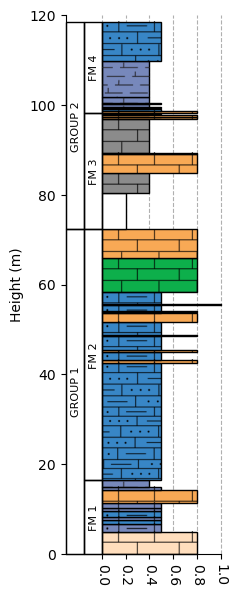
Plot the section, now using the label_units=True and unit_label_wid_tot=0.3 arguments.
The unit_label_wid_tot parameter specifies the horizontal fraction of the axis that is used for the unit interval labels; increase this if the labels are too cramped.
fig = plt.figure(figsize=(2, 7))
ax = plt.axes(ylim=[0, 120])
section_1.plot(style_1, ax=ax, label_units=True, unit_label_wid_tot=0.3)
plt.show()
Annotations
Plotting annotations alongside stratigraphic columns is a conventional way of illustrating observations at given heights within the section, and pystrat is capable of plotting annotations.
Annotations must be added to the pystrat.Section object as a pandas.DataFrame. This DataFrame must contain height and annotation columns:
The height column contains the stratigraphic heights at which to plot the annotations.
The annotation column contains the names of annotations that are mapped to
.pnggraphics which are plotted as annotations.
ann = pd.read_csv('example-data/annotations.csv')
ann
| height | annotation | |
|---|---|---|
| 0 | 62.0 | stromatolite |
| 1 | 89.2 | stromatolite |
section_2 = pystrat.Section(litho_df['THICKNESS'],                           # unit thicknesses
                            litho_df['FACIES'],                              # unit facies
                            units=litho_df[['GROUP', 'FORMATION']].values,   # group and formation names
                            annotations=ann)                                 # add annotations
Default Annotations
The mapping between annotations and graphics is specified in a pystrat.Style object.
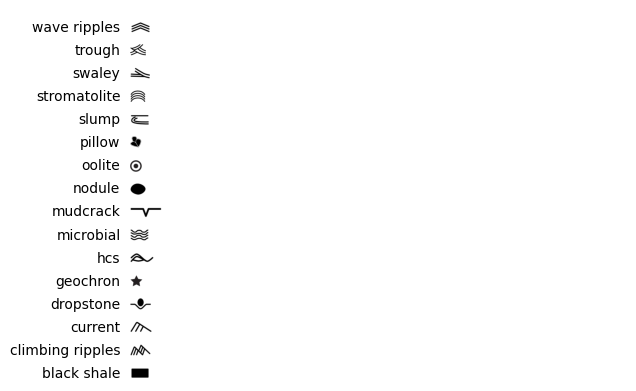
There are a couple ways of specifying which annotations to plot. pystrat comes with a small library of annotation illustrations. The available annotations can be visualized with pystrat.Style.plot_default_annotations().
pystrat.Style.plot_default_annotations()
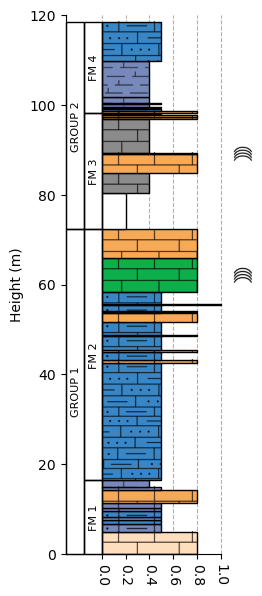
In the section above, only stromatolites need to be annotated. A Style object with stromatolite annotations can be initialized by passing the annotations=['stromatolite'] parameter.
style_2 = pystrat.Style(style_df['facies'],                  # labels (must include all unique facies)
                        style_df[['R','G','B']]/255,         # colors
                        style_df['width'],                   # widths
                        swatch_values=style_df['swatch'],    # swatches
                        annotations=['stromatolite'])        # annotations
Now, the section can be plotted with annotations at the desired heights.
fig = plt.figure(figsize=(2, 7))
ax = plt.axes(ylim=[0, 120])
section_2.plot(style_2, ax=ax, label_units=True, unit_label_wid_tot=0.3)
plt.show()
Custom Annotations
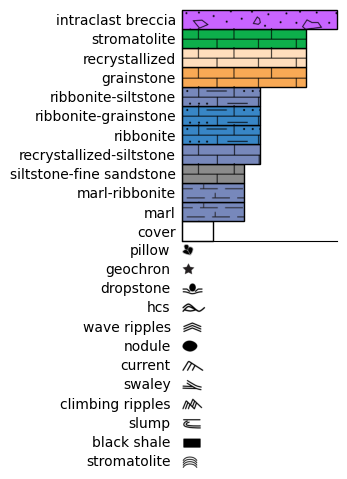
If an annotation is not available in the default library, custom graphics can be used by providing a dictionary that maps annotation names to .png paths.
ann_paths_df = pd.read_csv('example-data/annotation_paths.csv')
ann_paths_dict = dict(zip(ann_paths_df['name'], ann_paths_df['path']))
style_3 = pystrat.Style(style_df['facies'],                  # labels (must include all unique facies)
                        style_df[['R','G','B']]/255,         # colors
                        style_df['width'],                   # widths
                        swatch_values=style_df['swatch'],    # swatches
                        annotations=ann_paths_dict)          # annotations

fig, ax = plt.subplots(1, 1, figsize=(2, 3))
style_3.plot_legend(ax=ax)
Annotation Size
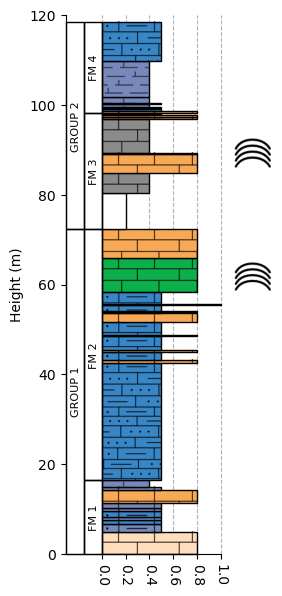
The size of the annotations can be controlled by the annotation_height parameter, which sets the annotation height in inches.
fig = plt.figure(figsize=(2, 7))
ax = plt.axes(ylim=[0, 120])
section_2.plot(style_2, ax=ax, label_units=True, unit_label_wid_tot=0.3, annotation_height=0.3)
plt.show()
Style Compatibility
It is possible to check the compatibility of a pystrat.Section with a pystrat.Style.
Use the pystrat.Section.style_compatibility function.
This function checks that all facies present in the section are defined within the style object. If the section and the style object both have annotations, it will also check that the annotations in the section are defined in the style object.
section_2.style_compatibility(style_2)
True
If the style object does not have annotations but the facies are well-defined, then the check will pass and annotations wouldn’t be plotted.
section_2.style_compatibility(style_1)
True
Stratigraphic Data
pystrat allows adding other types of data to pystrat.Section objects. There are three different types of data:
facies attributes: These data are defined on a per-bed basis; there must be one entry per bed in the section
data attributes: These data are defined at stratigraphic heights and are not explicitly tied to particular beds
generic attributes: These data are not tied to specific beds or stratigraphic height and instead describe other aspects of the section.
Facies Attributes
Facies attributes are added to a section object with pystrat.Section.add_facies_attribute:
section_1.add_facies_attribute('lithology', litho_df['LITHOLOGY'])
Once added, the attributes can be accessed as any other attribute.
section_1.lithology
array(['dolomite', 'dolomite', 'dolomite', 'dolomite', 'dolomite',
       'dolomite', 'dolomite', 'dolomite', 'dolomite', 'marl', 'dolomite',
       'dolomite', 'dolomite', 'dolomite', 'dolomite', 'dolomite',
       'dolomite', 'dolomite', 'dolomite', 'dolomite', 'dolomite',
       'dolomite', 'dolomite', 'dolomite', 'dolomite', 'cover',
       'siliciclastic', 'dolomite', 'dolomite', 'siliciclastic',
       'dolomite', 'dolomite', 'dolomite', 'marl', 'dolomite', 'dolomite',
       'limestone', 'marl', 'limestone', 'marl', 'limestone', 'marl',
       'marl', 'limestone'], dtype=object)
A dataframe representing the current state of the section object can be returned with pystrat.Section.return_facies_dataframe:
section_1.return_facies_dataframe().head()
| unit_number | thicknesses | base_height | top_height | facies | lithology | |
|---|---|---|---|---|---|---|
| 0 | 0 | 4.9 | 0.0 | 4.9 | recrystallized | dolomite |
| 1 | 1 | 1.8 | 4.9 | 6.7 | ribbonite-siltstone | dolomite |
| 2 | 2 | 0.8 | 6.7 | 7.5 | ribbonite | dolomite |
| 3 | 3 | 0.7 | 7.5 | 8.2 | ribbonite-siltstone | dolomite |
| 4 | 4 | 1.4 | 8.2 | 9.6 | ribbonite | dolomite |
Data Attributes
Data attributes refer to stratigraphic observations that are not uniquely tied to beds in the stratigraphy. pystrat handles these data with the pystrat.Section.Data subclass.
This example uses carbonate chemostratigraphy.
chemo = pd.read_csv('example-data/chemostratigraphy.csv')
chemo.head()
| CARB_SAMPLE | CARB_HEIGHT | CARB_d13C | CARB_d18O | CARB_87Sr/86Sr | CARB_Al_ppm | CARB_Ca_ppm | CARB_Fe_ppm | CARB_Mg_ppm | CARB_Mn_ppm | CARB_Sr_ppm | |
|---|---|---|---|---|---|---|---|---|---|---|---|
| 0 | T46-1.2 | 1.2 | 1.820429 | 0.130692 | NaN | 682.46931 | 313906.3927 | 293.408791 | 197499.6646 | 443.552746 | 539.226752 |
| 1 | T46-2.1 | 2.1 | 1.597633 | 0.134841 | NaN | NaN | NaN | NaN | NaN | NaN | NaN |
| 2 | T46-3.8 | 3.8 | 0.102096 | -0.195867 | NaN | NaN | NaN | NaN | NaN | NaN | NaN |
| 3 | T46-5.9 | 5.9 | 1.090520 | -1.066232 | NaN | NaN | NaN | NaN | NaN | NaN | NaN |
| 4 | T46-7.1 | 7.1 | 2.194324 | -0.630248 | NaN | NaN | NaN | NaN | NaN | NaN | NaN |
Add the \(\delta^{13}\)C data using the pystrat.Section.add_data_attribute() method:
section_1.add_data_attribute('d13C', chemo['CARB_HEIGHT'], chemo['CARB_d13C'])
This creates an instance of pystrat.Section.Data. It is possible to add attributes to these objects as well. For example, add the the sample names for the \(\delta^{13}\)C as follows:
section_1.d13C.add_height_attribute('sample', chemo['CARB_SAMPLE'])
Data can be returned as a DataFrame with pystrat.Section.Data.return_data_dataframe():
section_1.d13C.return_data_dataframe().head()
| height | values | sample | |
|---|---|---|---|
| 0 | 1.2 | 1.820429 | T46-1.2 |
| 1 | 2.1 | 1.597633 | T46-2.1 |
| 2 | 3.8 | 0.102096 | T46-3.8 |
| 3 | 5.9 | 1.090520 | T46-5.9 |
| 4 | 7.1 | 2.194324 | T46-7.1 |
Note that this function is defined for the Data sub-class and therefore acts on the section_1.d13C attribute in this case.
Add another data attribute, this time the \(\delta^{18}\)O measurements.
# d18O
section_1.add_data_attribute('d18O', chemo['CARB_HEIGHT'], chemo['CARB_d18O'])
section_1.d18O.add_height_attribute('sample', chemo['CARB_SAMPLE'])
All data attributes that have been added can be listed:
section_1.data_attributes
['d13C', 'd18O']
Data Attribute Plotting
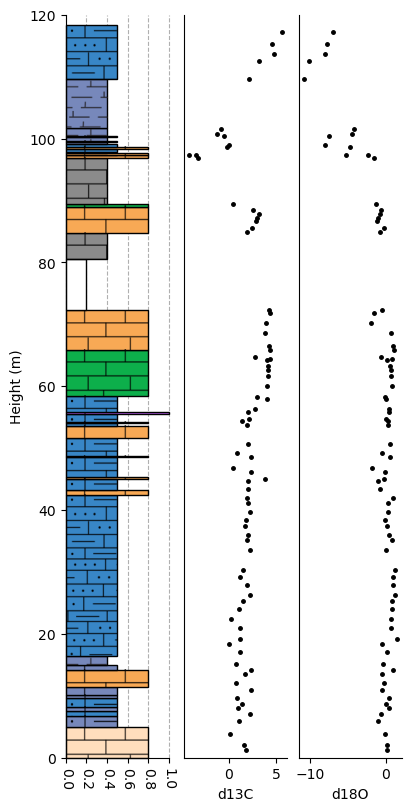
Data attributes can be plotted by directly accessing them from the section object. Alternatively, pystrat also provides pystrat.Section.plot_data_attribute:
fig, ax = plt.subplots(1, 3, figsize=(4, 8), sharey=True, constrained_layout=True)
ax[0].set_ylim([0, 120]) # remember to set y limits!

section_1.plot(style_1, ax=ax[0])

# plot data attributes
section_1.plot_data_attribute('d13C', ax=ax[1])
section_1.plot_data_attribute('d18O', ax=ax[2])

plt.show()
Generic Attributes
Generic attributes are not tied to specific beds or stratigraphic heights and instead describe other aspects of a section.
They are added with pystrat.Section.add_generic_attribute:
section_1.add_generic_attribute('locality', 'West Samre')
section_1.locality
'West Samre'
Helper Functions and Attributes
The pystrat.Section class also provides various helpful functions and attributes relevant to stratigraphic sections.
Units at Heights
Use pystrat.Section.get_units() to return the unit(s) at given stratigraphic height(s).
section_1.get_units(np.array([50, 100]))
array([['GROUP 1', 'FM 2'],
       ['GROUP 2', 'FM 4']], dtype=object)
Total Thickness
Use pystrat.Section.total_thickness to return the total thickness of the section.
section_1.total_thickness
118.4
Unique Facies
Use pystrat.Section.unique_facies to return the unique facies in the section.
section_1.unique_facies
array(['cover', 'grainstone', 'intraclast breccia', 'marl',
       'marl-ribbonite', 'recrystallized', 'recrystallized-siltstone',
       'ribbonite', 'ribbonite-grainstone', 'ribbonite-siltstone',
       'siltstone-fine sandstone', 'stromatolite'], dtype=object)
References
Swanson-Hysell, N.L., Maloof, A.C., Condon, D.J., Jenkin, G.R., Alene, M., Tremblay, M.M., Tesema, T., Rooney, A.D., and Haileab, B., 2015, Stratigraphy and geochronology of the Tambien Group, Ethiopia: Evidence for globally synchronous carbon isotope change in the Neoproterozoic: Geology, v. 43, p. 323-326, https://doi.org/10.1130/G36347.1.
MacLennan, S.A., Park, Y., Swanson-Hysell, N.L., Maloof, A.C., Schoene, B., Gebreslassie, M., Antilla, E., Tesema, T., Alene, M., and Haileab, B., 2018, The arc of the Snowball: U-Pb dates constrain the Islay anomaly and the initiation of the Sturtian glaciation: Geology, v. 46, p. 539-542, https://doi.org/10.1130/G40171.1.
Park, Y., Swanson-Hysell, N.L., MacLennan, S.A., Maloof, A.C., Gebreslassie, M., Tremblay, M.M., Schoene, B., Alene, M., Anttila, E.S.C., Tesema, T., Condon, D.J., Haileab, B., 2020, The lead-up to the Sturtian Snowball Earth: Neoproterozoic chemostratigraphy time-calibrated by the Tambien Group of Ethiopia: GSA Bulletin, vol. 132, pp. 1119–1149, https://doi.org/10.1130/B35178.1